Bottom of the iPhone screen not responding to touch? Try Apple's four steps first: restart the phone, clean the screen, unplug anything in the charging port, and take off the case and screen protector. If the bottom strip still ignores taps, Apple says "you might need to set up service for your device." Apple or a repair shop can tell you if it is the screen. Until then there are ways to keep using the phone, below.
Rather just ask? Text your question to PJ, a real person in Cardiff, and he answers it. Asking is free. Not sure if it is the screen or a setting? Text PJ
Apple's steps, in order
- Restart your iPhone.
- "Make sure that your screen is clean and free of any debris or water."
- "Disconnect any Lightning or USB-C accessories." Apple adds: if the screen works after that, try a different outlet, cable or charger.
- "Remove any cases or screen protectors."
From Apple Support, If the screen isn't working on your iPhone or iPad (published October 15, 2024), read Nov 21, 2026. Apple lists these for a screen that "is too sensitive or responds intermittently to touch."
More than one way to solve it
Solutions, not repairs. PJ: "There is multiple solutions to these problems these days."
- The repair: if the shop finds the screen is at fault, a new one. PJ's rough number is about $200; ask for the price on your model in writing before you leave the phone.
- Type by voice: Apple's guide: "Go to the Settings app on your iPhone. Tap General, then tap Keyboard. Turn on Enable Dictation." Then speak the message and the phone types it (Apple: Dictate text on iPhone).
- Turn the phone sideways: the keyboard redraws, so the keys that sat on the dead strip land on a part of the glass that still works. This is PJ's first try on a house call, not an Apple step.
- Talk to an AI assistant, like Claude or ChatGPT: say what you need (the email, the list, the form answer) and let it write the words. On a recent house call the bottom of a phone's touch screen had stopped responding; the job the owner was stuck on could have been done that way the same day, with the screen left for later.
- Use another screen: the same accounts open on a computer or tablet while the phone waits for its repair.
Where a screen gets replaced near Encinitas
- Apple: the "Get service" button on Apple's screen page starts a repair with Apple.
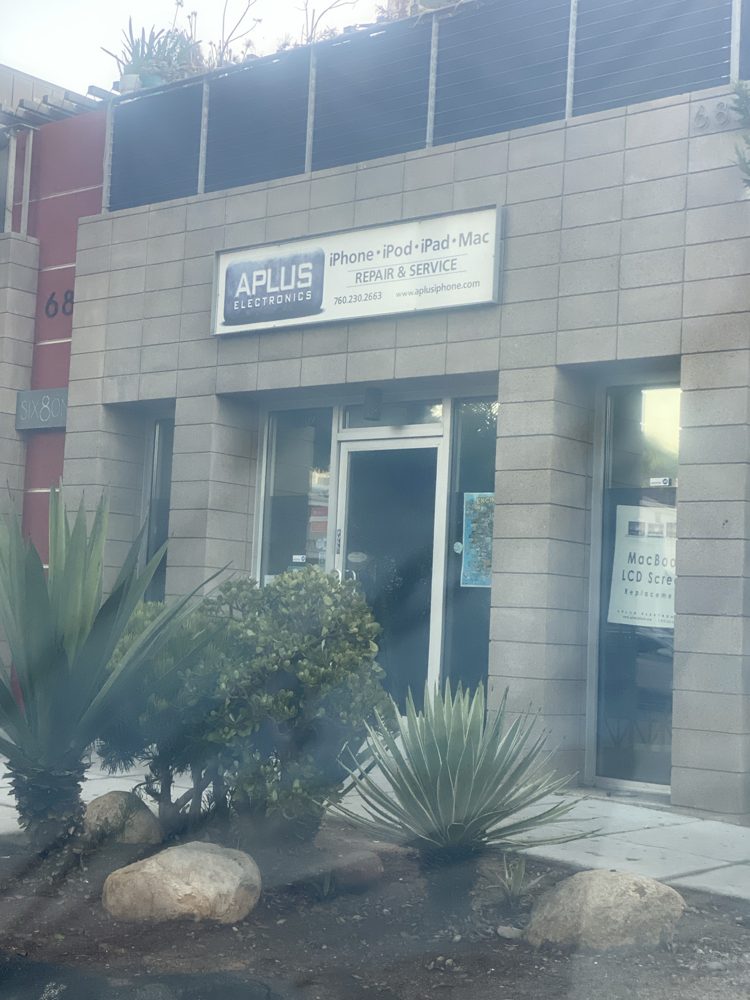
- APlus Electronics, 681 2nd Street #102, Encinitas, 760-230-2663: iPhone, iPad and Mac repair, walk-in, Monday to Friday 10am to 6pm by its own site. PJ's favorite repair shop in town. Not affiliated with SideGuy.
- uBreakiFix Phone and Computer Repair, Encinitas, 191 N El Camino Real, Suite 109, 760-642-3058. It lists itself as an "Independent Repair Provider for Apple" and offers free diagnostics; its site says tests for more complicated issues may cost $39.99 to $59.99, and that it tells you beforehand. Not affiliated with SideGuy.
Before you leave a phone anywhere, check the shop is registered with the State and get the estimate in writing: iPhone and Mac repair near Encinitas: pick a registered shop.
PJ does not replace screens. Back the phone up before any repair: a backup plan for photos and files. Storage full and the backup won't run? iPhone storage full. Everything PJ helps with: in-home computer and tech help.
Want a human to just do it?
- At your home: PJ runs Apple's checks with you, sets up voice typing and an AI assistant so you can keep working, backs the phone up, and tells you plainly if it needs a shop. $50 an hour.
"It's about being nice and showing up." PJ, a real person in Cardiff and Solana Beach. He never keeps a passcode. Prices are set in one place and shown before anything starts.
Sources
Checked against 4 sources. Open any of them to check a number.
- If the screen isn't working on your iPhone or iPad support.apple.com
- Apple: Dictate text on iPhone support.apple.com
- APlus Electronics aplusiphone.com
- uBreakiFix Phone and Computer Repair, Encinitas ubreakifix.com
Need a human?
This page is built every morning from public data by SideGuy, run by PJ, a local in Cardiff. If something looks off, or you want a hand with your plans, text PJ at 858-461-8054. A real person answers.
Local help, free to read: make your fix plan · senior benefits checkup · lower your SDG&E bill · Medicare Extra Help · every 2027 Medicare plan · is my medication recalled? · the next 90 days. Plans start as low as $25. Your parent lives here and you don't? The Parent Check-In Plan, $25 a month.
Questions people ask
Why is the bottom of my iPhone screen not working?
Apple's steps for a screen that responds intermittently: restart the iPhone, clean the screen, disconnect Lightning or USB-C accessories, and remove any case or screen protector. If it still isn't working, Apple says you might need to set up service for the device.
How can I type if the bottom of my iPhone screen doesn't respond?
Turn on Dictation (Settings, General, Keyboard, Enable Dictation) and speak the text, turn the phone sideways so the keyboard moves, or tell an AI assistant what you need and let it write it.
Where can I get an iPhone screen replaced in Encinitas?
Apple's Get service page starts a repair with Apple. uBreakiFix in Encinitas, 191 N El Camino Real, Suite 109, 760-642-3058, lists itself as an Independent Repair Provider for Apple and offers free diagnostics (complex tests may cost a fee). APlus Electronics, 681 2nd Street #102, 760-230-2663, repairs iPhones, iPads and Macs, walk-in on weekdays.
Does SideGuy replace iPhone screens?
No. SideGuy offers help and solutions at home, not hardware repair: Apple's checks, a backup, and ways to keep working until the repair. $50 an hour in North County.
Know someone who needs this?
Got a question about this? Ask PJ a question. A real person in Cardiff texts you back.
Something changed here? Text PJ the fix: if it changes this page, you get $5. How it works.
Spotted something new around town? Text it in. What do you want to see here? Ask PJ for a page. No login, a real person reads it.
More free local tools: the North County toolkit.